Text On Curve

Commands ››
Parent Previous Next

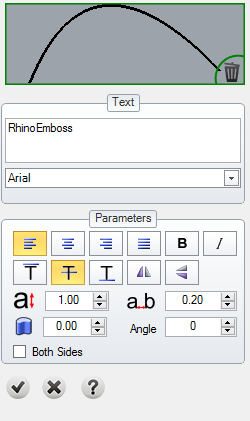
This tool allows us to create 2D text on 2D and/or 3D curves.


Toolbar

RhinoEmboss > Text on Curve

Menu

RhinoEmboss > Text on Curve

Command

RhinoEmbossTextOnCurve


Steps:


  1. Select the curve to define the text along.


  1. Type the text to insert.


  1. Choose the font of the letters.


  1. Define the letters height and distance.


  1. Choose the Text orientation options.


  1. Click on the preview icon and verify the results.


  1. Click on the checkbox to add the letters to the document.